


XVX All Video Downloader
3.812.00 Reviews
App Specs
- Version
- 15.0
- Updated On
- License
- Free
- Downloads
- 100,000+
- Developer
- TAYAL TRADERS
- Categories
- Video Players & Editors
- Platform
- Android
Screenshots

 Analysis by AppCompare
I judge a video downloader not just by whether it can save a clip, but by how manageable the whole process feels: finding the right video, starting a download, and locating it later. XVX All Video Downloader is aimed at people who want MP4 videos available offline, with automatic video detection doing some of the work. That focus can be useful when a connection is unreliable or watching online is inconvenient, but it also makes clarity and control especially important. In my view, this is a practical, narrowly focused tool rather than a complete video-editing or media-management app.
A quick test before relying on it
If I were setting it up for someone else, I would not begin by filling the phone with a queue of videos. I’d first use a clip that is short, easy to recognize, and unimportant if the download needs to be repeated. That one trial can answer several practical questions at once: whether the app detects the kind of page they use, whether the action is understandable, and where the completed file appears. It also gives the person a chance to learn the flow without pressure.
This approach is particularly useful for a shared or older device, where storage and navigation may already feel constrained. A small test lets you judge the app in the setting where it will actually be used, rather than deciding from a brief description. If the file is difficult to identify afterward, a more familiar download method may be the better choice even if detection initially seems convenient.
Finding your way around the download flow
The app sits in the video-player and editing category, though its main purpose is downloading rather than editing. Its short store label is simply “XVX,” while the full name, XVX All Video Downloader, better conveys what someone should expect. The developer is TAYAL TRADERS. I would approach it as a straightforward utility: decide what you want to keep, use the app’s detection or download flow, then check that the saved file is the one you meant to collect.
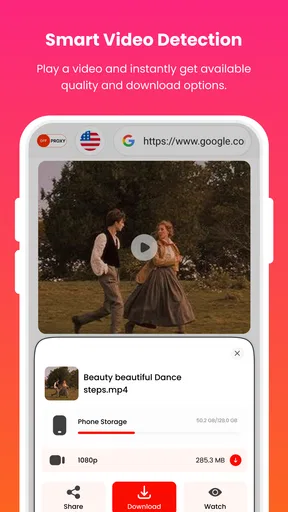
Smart detection can reduce the fiddly step of identifying a video manually, which matters when a page contains several clips or the player is embedded among other content. But automatic detection is only helpful if it makes the next action obvious. Before tapping a download option, I’d pause to check the detected title or preview if one is shown, and confirm that the selected item is the intended video. That small habit helps avoid collecting a duplicate, an advert, or a clip in the wrong language when a page offers several choices.
For readability, I value a clear distinction between a detected video, an active download, and a finished file. Those are different stages, and a person should not have to guess whether a tap worked. When trying XVX, I’d test the route with a short, familiar clip first. That gives you a low-stakes way to learn where the app reports progress and where completed MP4 files can be found before relying on it for something important.
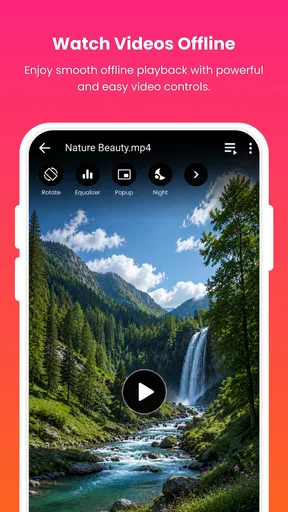
Offline playback is part of the app’s purpose, so the workflow should not end when a file finishes downloading. I recommend opening the saved video within the app, if available, and checking that sound and picture behave as expected before heading somewhere without internet. If you plan to watch through another player, test that route too. This is especially useful for a person who needs reliable playback for a trip, a class, or a shared device: finding a file only after connectivity disappears is a frustrating time to discover a format or location problem.
Worth Reading Before You Choose

Flipboard Shows What News Apps Must Do Beyond the Feed

Switching to Android Auto Means Rethinking Your Driving Routine

Google Calendar Makes a Crowded Week Easier to Manage

Ludo King Makes the Most of the Minutes Between Plans

Baby Panda World Brings Quick Play to Modern Phones, but Its Game Library Feels Busy

ESPN’s Live Game View Makes Following Close Games Easier
Small workflow choices that reduce confusion
A useful routine is to download one item at a time until you understand how XVX handles detection and completion. If several videos are started together, it can be harder to tell which is still transferring and which is ready, particularly on a small screen. Once the sequence feels familiar, batching may save effort, but I would still verify each finished file rather than assuming every detected item was the intended one.
I’d also keep the purpose of each download in mind. If a video is needed for a presentation or a family journey, give it a recognizable filename or place it in an organized folder when the app or device allows that. This is not a special XVX feature; it is a practical way to make offline viewing less dependent on remembering what a generic file contains. A quick playback check before leaving home is more dependable than relying on a thumbnail alone.
Touch, vision, hearing, and comfort
A download tool can be demanding for someone with limited dexterity if key controls are crowded or if starting, pausing, and reopening a file require repeated precise taps. I can’t assume that XVX offers particular accessibility controls, so I’d advise testing its core actions on the device it will actually be used with. Try detecting a video, starting a download, and opening the result. If those steps require awkward tapping or frequent back-and-forth navigation, a simpler browser download route or the device’s built-in media tools may be more comfortable.
For people with low vision, the most important practical check is whether text, buttons, and download status remain understandable at the device’s chosen display size. Enlarging system text can help, but some layouts become harder to use when content is magnified. I’d test the app with the preferred text and display settings before committing to it. If a label is ambiguous, take time to confirm the action rather than tapping by position from memory; a download screen can contain choices with very different results.
For someone who is hard of hearing, video use may depend on captions, but I would not treat a downloader as a captioning tool. Captions available in an online player may not necessarily be carried into a saved MP4, so check the actual offline file before counting on subtitles. If captions are essential for understanding, a platform’s own offline feature or a video source that provides a separate caption file may be a better fit. Likewise, someone sensitive to motion or bright imagery can choose when and where to preview clips, rather than opening them unexpectedly in a quiet or shared setting.
One non-obvious trade-off is that automatic detection can make the app feel quicker while offering less certainty about what it has identified. That is not necessarily a flaw, but it changes the best habit: treat detection as a suggestion to inspect, not as proof that the right video is selected. This approach is especially helpful for people who use assistive input, need extra time to interpret a screen, or simply want to avoid unnecessary data use.
When offline access makes a real difference
A realistic use case is preparing for a long train ride through areas where mobile coverage drops in and out. At home, I’d choose only the videos I genuinely intend to watch, download them while connected, then open each one to confirm it plays and has the expected audio. That preparation turns the app’s offline focus into a real convenience. It also avoids the familiar disappointment of reaching a tunnel or rural stretch and discovering that a video is still buffering online.
XVX may also suit someone who wants a small collection of reference clips available during work or study. For example, a person could save a how-to video before entering a room with unreliable Wi-Fi, then replay the relevant section without repeatedly loading the page. The sensible limit is to keep the collection purposeful: downloaded video takes storage, and a pile of forgotten files makes it harder to find the one that matters. Periodically reviewing and removing clips you no longer need is a simple way to keep the device usable.
In a household, offline files can be useful when a child or another family member will use a device without a dependable connection. The app is marked suitable for Everyone, which makes its content rating broad, but that does not mean every video downloaded through it is appropriate for every viewer. I’d choose the source carefully and supervise downloads for younger users. The rating describes the app’s audience classification, not the contents of videos someone chooses to save.
Limits, alternatives, and sensible expectations
The most important limitation is that a downloader is only as useful as the video sources and playback situations it supports. Smart detection does not guarantee that every page or player will offer a saveable file, and a video that is visible online may still fail to become a usable offline copy. If a particular source is central to your routine, test it before depending on XVX for travel or work. When reliability matters more than flexibility, the source service’s own offline viewing option is often the safer choice because it is designed around that service’s content and playback.
There is also a meaningful difference between downloading and editing. Although XVX belongs to a category that includes video editors, its stated appeal is collecting MP4 videos and watching them offline. If you need trimming, captions, color correction, or a polished export, a dedicated editor is a better match. If you mainly want a broad library of films and shows, a streaming app with offline viewing is likely more convenient than manually finding and managing individual files.
For ordinary playback, a phone’s built-in player may be enough once a video is already saved. XVX is more relevant when the detection and download steps are the problem you want to solve. That comparison helps set expectations: it is not automatically a replacement for a media library, an editor, or a streaming subscription. Its value depends on whether its particular route from online video to offline MP4 fits your habits.
The app is free, has an average rating of 3.8 from around 500 ratings, and has passed 100,000 installs. Those figures suggest that people have tried it, but they do not tell me whether its detection will work with a specific site or whether its controls will suit an individual. The released date is April 27, 2026, and version 15.0 is the current version. It requires Android 10 or later, so anyone using an older Android device should check compatibility before planning a workflow around it.
Who is likely to benefit—and who may not
I’d consider XVX if I regularly need selected MP4 videos available away from a stable connection and I’m willing to check each download before relying on it. Its strongest case is a person who values quick detection and wants a direct path to offline playback without needing a full editing suite. Someone who watches only occasionally may be better served by the original video service’s own offline mode, where available, or by a standard player for files already on the device.
I’d be more cautious if accessibility depends on particular screen-reader behavior, large controls, reliable captions, or highly predictable navigation. The right decision is not to infer support from the app’s broad age rating or from the promise of smart detection; it is to try the actual steps with the settings and input methods you depend on. If a test download is hard to start, identify, or replay, there is little reason to force the workflow when a platform-native option may be easier.
Overall, I see XVX as a focused convenience app whose usefulness comes down to whether it can make a chosen video easier to keep and watch offline. Its detection-led approach can save effort, and a little preparation—checking the selected clip, confirming playback, and keeping files organized—makes that benefit more dependable. It is not the right answer for every source, every accessibility need, or every editing task. For someone who wants a simple way to prepare a few MP4 videos before connectivity becomes uncertain, it is worth testing; for anyone who needs guaranteed captions, advanced editing, or a fully predictable accessible interface, I’d compare alternatives first.
Pros
- Downloads videos from multiple supported websites in one place.
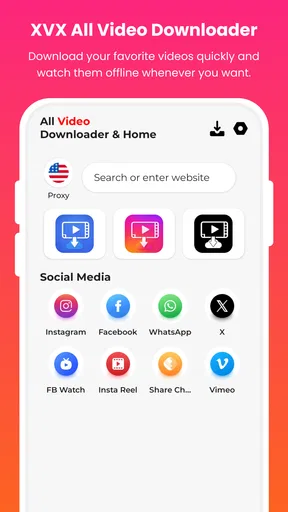
- Built-in browser makes it easier to find and save videos.
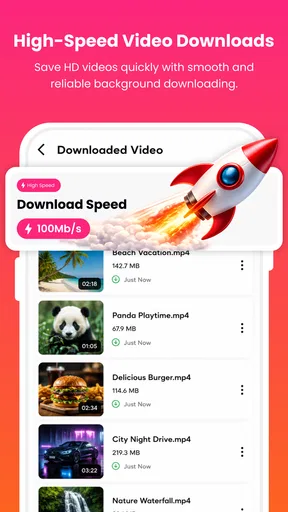
- Download progress is visible while files are being saved.
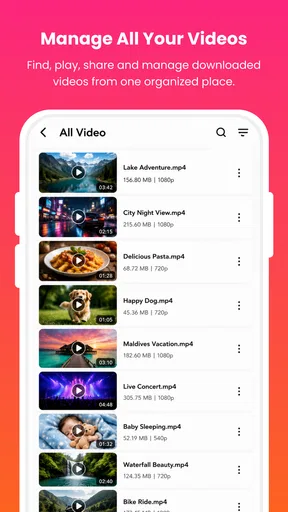
- Saved videos can be watched offline from the app.
- Simple interface is easy for first-time users to navigate.
Cons
- Some websites may not be supported or may change compatibility.
- Download speed depends on your connection and the source website.
- Ads may interrupt browsing or downloading.
- Large video files can use substantial storage space.
- Downloading copyrighted videos without permission may violate the law.
FAQs for XVX All Video Downloader
What is XVX All Video Downloader used for?
XVX All Video Downloader is designed to help users save supported online videos to their devices for later viewing. Its available features may include detecting media links, choosing a download quality, and managing downloaded files within the app. The sites and formats it can handle can change, so check the app’s current description and permissions before installing, and use it only with content you are allowed to download.
Can XVX All Video Downloader download videos from any website or social media platform?
No downloader can be assumed to work with every website or platform. Compatibility depends on the source’s technical setup, regional availability, and restrictions imposed by the service. Some platforms block downloading or require you to use their official offline-viewing feature. If a link is not recognized, avoid entering account credentials into unofficial pages or installing extra components; consult the app’s current listing for supported sources.
Is it legal to download videos with XVX All Video Downloader?
That depends on the video, the source, and the laws and terms that apply where you live. Saving your own videos or material that the creator has explicitly made downloadable is generally different from copying copyrighted content without permission. A platform’s terms may also prohibit downloading outside its official tools. Before saving or sharing a video, confirm that you have the rights or authorization to do so.
Is XVX All Video Downloader safe, and what permissions should I expect?
Safety cannot be guaranteed from an app name alone, and features or permissions can vary between versions and stores. Review the developer information, recent user feedback, privacy policy, and requested permissions before installing. File or media access may be needed to save downloads, but permissions unrelated to that purpose deserve extra scrutiny. Install from a trusted store where possible, keep the app updated, and avoid granting access you are not comfortable with.
Where are downloaded videos stored, and can I watch them offline?
Videos successfully saved to your device can usually be opened later without an internet connection, provided the file remains available and your device supports its format. The exact save location, file-management options, and playback support depend on the app version and device settings. Check the app’s downloads section and Android or iOS storage settings to locate files; on some devices, downloads may remain inside the app rather than appearing in the gallery.


